


The Challenge
When implementing Oracle Fusion Cloud Financials, geography setup is often overlooked on minimal configuration checklists. Yet this “minor” oversight creates cascading problems across multiple areas: tax calculations that mysteriously fail, duplicate supplier addresses cluttering your system, manual workarounds that introduce human error, and hours spent fixing invoice validation issues.
Geography is part of Enterprise Foundation and is shared by both CRM and Financials. Missing out on this configuration—or not doing it efficiently—introduces considerable limitations in your final solution design with implications across multiple configurations and usage.
Why Geography Matters
Geography in Oracle Fusion Cloud is the system’s structured framework for storing and managing location-based information. It’s not just about addresses—it directly impacts:
Tax Configuration – The backbone of tax setup, determining applicable tax regimes (VAT, GST, sales tax), calculating rates based on transaction locations, and supporting compliance requirements by jurisdiction.
Legal Entity and Ledger Configuration – Each legal entity must be assigned a country, which determines legal reporting requirements, chart of accounts structure, and accounting calendars.
Intercompany and Transfer Pricing – Geographic locations define intercompany relationships and transfer pricing rules between legal entities in different countries.
Bank Account and Payment Processing – Different countries require different bank file formats (NACHA, SEPA, BACS), with geography determining which formats and validation rules apply.
Compliance and Statutory Reporting – Enables country-specific features like localization requirements, regulatory reporting formats, and withholding tax rules.
A Real-World Example: The Mauritius Case
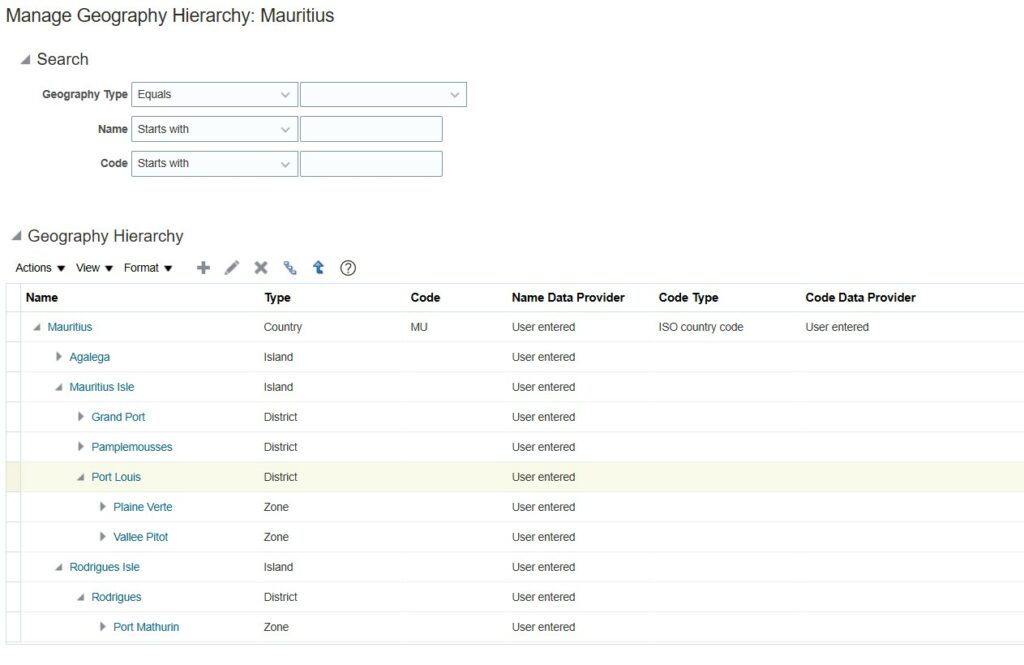
The power of proper geography configuration becomes clear through a practical example. Mauritius consists of several small islands with simple tax logic: if a taxable item is procured within the territory, a standard 15% tax applies.
However, three major problems emerged:
- Island Misclassification – When suppliers shipped from Rodrigues, tax didn’t apply because it was configured as a separate country
- Duplicate Address Data – The same city (Port Louis) appeared written differently across records
- Tax-Free Zones – Taxes incorrectly applied even in designated tax-free zones
Common workarounds created new problems: multiple tax regimes complicated reporting, treating islands as address lines broke location-based reports, and manual tax entry introduced errors.
The Solution
By properly designing the geography structure and hierarchy, all three problems disappeared:
- Introduce islands at a level prior to country: Address Line 1, City, Island, Country
- Example: Route Royale, Port Louis, Mauritius, Mauritius
- Design cities as list of values to enforce data quality
- Introduce tax-free zones in the structure for automated tax engine rules
This delivered seven critical benefits: single tax regime at country level, clear postal address breakdown, enforced address standards, automated tax-free zone handling, centralized reporting, reliable tax reconciliation, and fully automated tax configuration.
Implementation Overview
The configuration process follows six key steps:
Step 1: Plan Your Hierarchy Structure – Map out your structure based on multiple purposes where it will be used, ensuring subsequent designs will function properly.
Step 2: Verify Available Data – Check whether Oracle provides geographic data for your countries or if you can copy from similar structures.
Step 3: Build Your Structure – Load existing data, copy from similar geographies, or create manually.
Step 4: Configure Management Rules – Decide how to manage address cleaning, hierarchy, and whether to use lists or free text.
Step 5: Test Thoroughly – Validate functionality by creating test suppliers, customers, or transactions.
Step 6: Document Data Standards – Draft data cleaning rules for your team to maintain data quality over time.
Best Practices and Considerations
Start by mapping your legal entity structure and geographic locations before configuring ledgers and tax. Ensure geography reference data is complete and accurate upfront. Consider whether Oracle’s delivered geography hierarchies meet your needs or if custom structures are required for specific reporting requirements.
The investment in proper geography setup enables automated tax calculation, eliminates manual data cleanup, supports accurate reporting, and provides a foundation for geographic analysis and business intelligence.
The Bottom Line
Geography configuration is a strategic decision that either enables or constrains your entire Fusion Financials implementation. Organizations that get this right from the start enjoy automated tax calculation, clean data, and reliable reporting. Those that don’t find themselves trapped in endless cycles of data cleanup and manual intervention—spending months fixing what could have been configured properly in hours.
The choice is simple: invest time upfront in proper geography design, or spend years managing workarounds and data quality issues. Your future finance team will thank you for making the right choice.
Author: Shameem Bauccha